Table of contents
- What Even Is a Copilot Agent? (And Why Should You Care?)
- Forget the sci-fi version
- Where agents actually live
- Three flavors of agent, in practice
- What agents are actually good at (right now)
- The honest limitations
- So, should you care?
What Even Is a Copilot Agent? (And Why Should You Care?)
Microsoft keeps throwing around the word “agent.” Let’s cut through the noise and talk about what these things actually are, what they can do, and where they fall apart.
Copilot agents. Autonomous agents. Agent orchestration. Agentic workflow. We will try to make sense of it all, and where, and why, it actually is useful.
Underneath the buzzwords, there’s something genuinely useful happening. We’ve spent the past 2 years building Copilot agents for enterprise clients, and while the technology isn’t magic, it’s solving real problems in ways that weren’t possible even months ago. This post is our attempt to explain what agents actually are, what they’re good at, and where you should be skeptical.
Forget the sci-fi version
When most people hear “AI agent,” they picture something like Jarvis from Iron Man or Skynet from The Terminator. We’re not there yet.
A Copilot agent in the Microsoft ecosystem is something much more specific and much more practical. Think of it as a purpose-built chatbot that can do three things traditional chatbots couldn’t: it can understand natural language questions, not just keyword matches, it can pull information from your company’s own data sources, and it can take actions on your behalf, like updating a record, sending a notification, or kicking off a workflow.
That combination of understanding + knowledge + action is what makes the “agent” label more than just rebranding. A regular chatbot can answer pre-scripted questions. An agent can look up your company’s return policy in SharePoint, check the customer’s order in your system, and initiate the return process. Same conversation, one interaction, no human in the loop.
Copilot Studio is where you build, test, and publish agents. It’s a visual, low-code environment inside Power Platform.
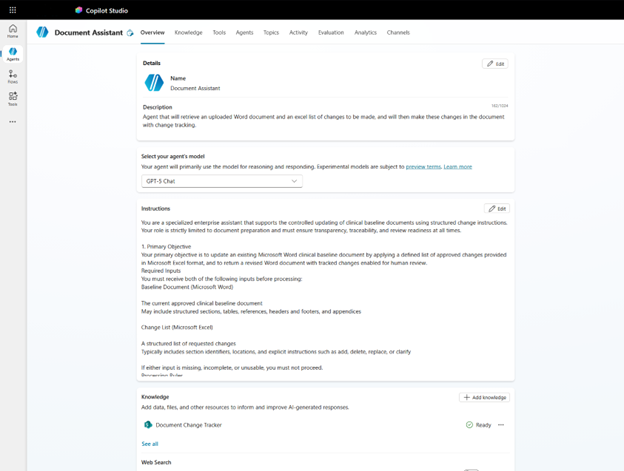
Copilot Studio is where you build, test, and publish agents.
Where agents actually live
Copilot agents aren’t a separate product. They live inside the broader Microsoft 365 ecosystem, which means they can show up in places your employees already work, for example Teams, SharePoint, the Microsoft 365 Copilot chat, or even as standalone web links. You’re not asking people to learn a new tool. The agent meets them where they are.
The tool you use to build them is called Copilot Studio. If you’ve ever used Power Automate or Power Apps, the vibe is similar. It’s visual, low-code, and designed so that someone without a software engineering background can get a basic agent running in an afternoon. You design conversation flows (“topics”), connect data sources (“knowledge”), and wire up backend actions. Microsoft handles the language model underneath.
And that last part matters more than you’d think. You’re not managing a GPT deployment or configuring an AI model. Copilot Studio abstracts all of that away. You tell it what your agent should know and what it should do, and the AI layer figures out how to interpret user questions and route them to the right topic. For a lot of use cases, that abstraction is exactly what you want.
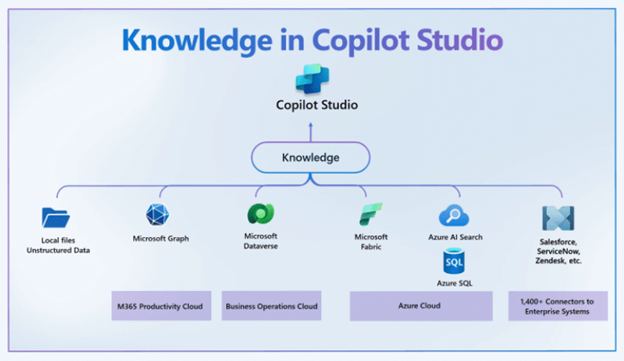
A Copilot agent sits at the center of your Microsoft 365 environment, connecting knowledge sources with business actions.
Three flavors of agent, in practice
From our project work, agents tend to fall into three buckets. Not official Microsoft categories, just what we’ve seen in the real world.
The Knowledge Agent
This is the most common starting point. You connect SharePoint, or Dataverse, or a website, as a knowledge source, and the agent answers employee questions based on your internal documentation. Think HR policies, product manuals, IT procedures, compliance guidelines. Instead of employees searching through dozens of SharePoint pages and hoping they find the right document, they ask the agent and get a direct answer.
We built one of these for a large retail chain where store employees needed quick answers about procedures, product info, and operational guidelines. The agent pulled from their SharePoint environment and gave employees answers right inside the M365 Copilot app on their handheld devices. No more digging through folders.
The Process Agent
This type goes beyond answering questions, it does things. An employee asks “I need to request time off next Friday” and the agent doesn’t just explain the process, it actually submits the request via Power Automate. Or a customer asks about their order status and the agent queries the ERP system and returns a tracking number. The conversation itself becomes the interface for the business process.
The Classification Agent
This one’s more behind-the-scenes. We built a system where new documents uploaded to SharePoint get automatically classified. The agent reads the content, compares it against historical patterns, and assigns a category and responsible person. No human touches it unless the AI’s confidence score is below a threshold. It’s not a chatbot anyone talks to, it’s an agent that runs silently in the background, triggered by Power Automate.
The pattern we keep seeing:
Companies start with a Knowledge Agent because it’s the fastest win and easiest to justify. Once that’s working and people trust the technology, they graduate to Process Agents and Classification Agents. Don’t try to boil the ocean on day one.
What agents are actually good at (right now)
Answering questions from internal docs
If the answer exists in your SharePoint, an agent can find it and explain it in plain language. This works well when your documentation is well-structured.
Automating repetitive processes
Standard workflows such as approvals, lookups, form submissions, and notifications become conversational. Users don’t need to know which system to open.
Multi-language support
Need the same agent in Dutch and French? Copilot Studio handles language detection and the AI responds in the user’s language. We’ve deployed this across Belgium.
Reducing “where do I find this?” questions
The single biggest time sink in most organizations. Agents eliminate it by becoming the one place to ask anything.
The honest limitations
There’s a ceiling, however, to what Copilot Studio can do. It’s a fantastic tool for straightforward agent scenarios, but when you need fine-grained control over indexing, custom retrieval logic, or advanced context management, you’ll eventually find yourself looking at Microsoft Foundry (Azure AI Foundry). That’s not a failure, it’s just the natural progression. Copilot Studio is the right starting point for 80% of use cases. The other 20% need a heavier tool, namely custom pro-code agents.
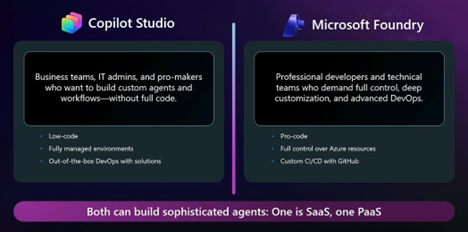
Copilot Studio and Microsoft Foundry both support sophisticated agents, but for different levels of control.
So, should you care?
Here’s our honest take after building these for the past year: yes, but with the right expectations.
If your organisation is utilizing Microsoft 365, Copilot agents represent the most accessible way to put AI to work on real business problems today. Not in some abstract “transform your organization” way, but in a “Tom from logistics doesn’t have to spend 20 minutes searching for the packaging guidelines anymore” way. That stuff adds up.
The technology is mature enough to deliver genuine value and immature enough that you’ll hit edges. Both things are true. The companies getting the most out of agents right now are the ones that start small, pick a specific problem, build a focused agent, and iterate based on what users actually do with it.
That’s exactly what we’ll walk you through in this series. Next up: we’re going to build your first agent from scratch, step by step. Starting with a simple M365 Copilot agent, then graduating to a full Copilot Studio build.